
Batching strategies for efficient scaling
This notebook demonstrates a production-ready pattern for processing millions of items efficiently using Flyte v2’s advanced features. You’ll learn how to build resilient, scalable workflows that can handle failures gracefully and optimize resource consumption.
Use Case
The Challenge: Processing massive datasets (100K to 1M+ items) that require external API calls or long-running operations.
Real-World Examples:
- Web scraping large lists of URLs
- Batch inference on millions of data points
- Processing documents through external APIs
- ETL pipelines with rate-limited services
- Data validation against third-party services
The Problem: When you have so many inputs that you must:
- Split them into batches
- Submit each batch to an external service and wait for completion
- Handle failures without losing progress
- Optimize resource usage across thousands of operations
Why This Matters: Without proper batching and checkpointing, a single failure in a million-item workflow could force you to restart from scratch, wasting compute resources and time.
Goals
Our Goals:
- Resilience: Mitigate the impact of batches that take longer or fail
- Determinism: Make operations with external API dependencies predictable and resumable
- Efficiency: Optimize resource consumption through container reuse and parallel processing
- Cost Savings: Minimize wasted compute by checkpointing progress
Solution Architecture
This example demonstrates a production-ready micro-batching pattern that combines some Union features, including:
1. Failure transparency with @flyte.trace
The @flyte.trace decorator creates automatic checkpoints:
- What it does: Records inputs and outputs of decorated functions
- Why it matters: If a task fails, it resumes from the last successful checkpoint
- Result: No re-execution of completed work
2. Reusable Containers for Efficiency
Instead of creating a new container for each task:
- Container pools: Pre-warmed replicas ready to handle work
- Concurrent processing: Each replica handles multiple items simultaneously
- Automatic scaling: Replicas scale between min/max based on workload
- Resource optimization: Dramatically reduced startup overhead
Key Benefits:
- Automatic checkpointing at batch and operation boundaries
- Resume from last successful point on any failure
- No wasted compute - never re-execute completed work
- Massive parallelism - process thousands of batches concurrently
- Cost efficient - container reuse minimizes cold-start overhead
Architecture Flow:
1M items → Split into 1,000 batches (1K each)
         ↓
    Parallel processing across reusable container pool
         ↓
    Each batch: Submit → Poll → Checkpoint
         ↓
    Aggregate results from all batches
Architecture Diagram
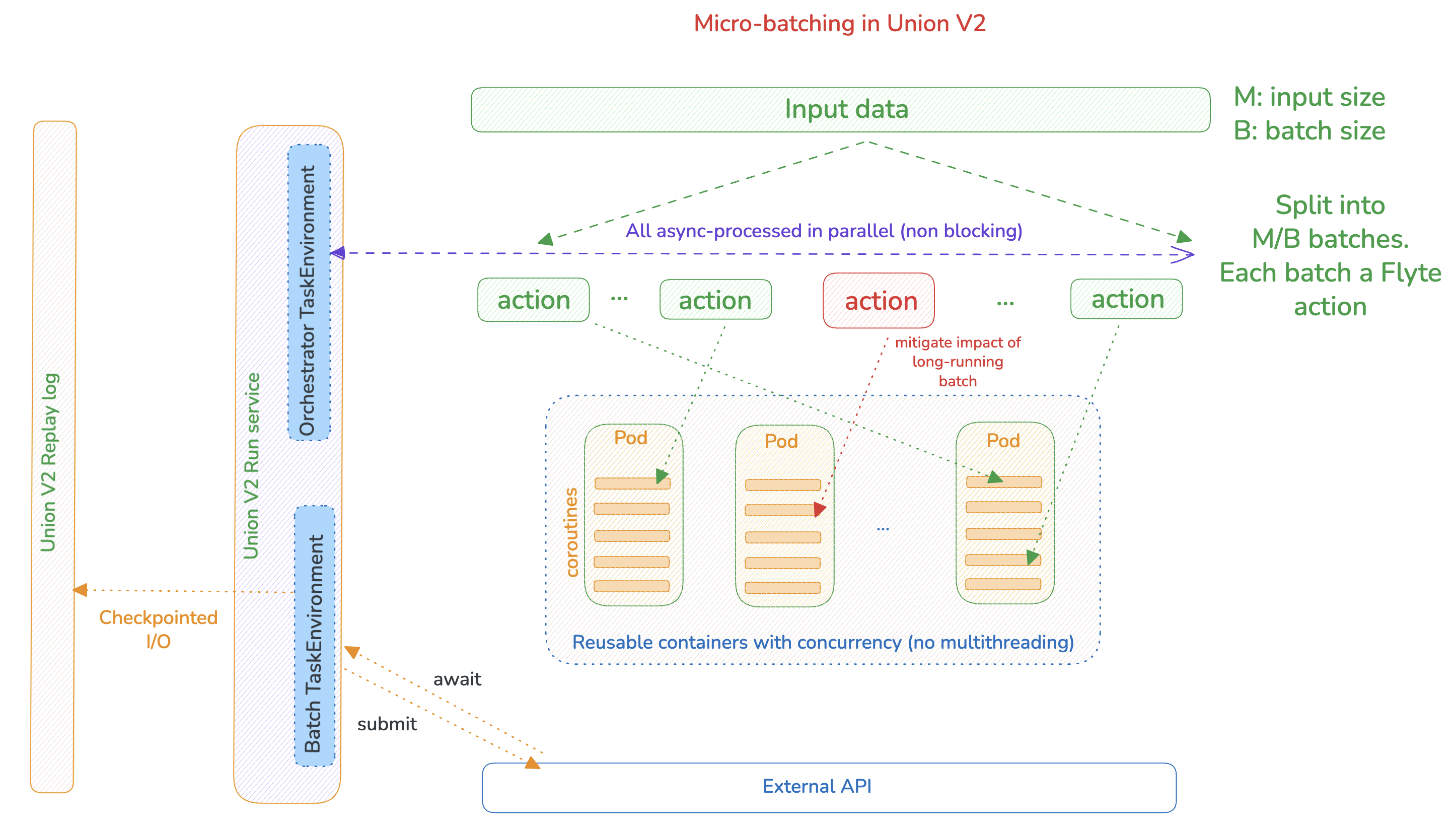
Diagram shows:
- Input data split into batches
- Reusable container pool
- Concurrent processing within each replica
- Submit and wait phases with
@flyte.tracecheckpoints - Parallel execution across all batches
Implementation
Step 0: Set up the runtime
Prepare the runtime environment for execution
!uv pip install --no-cache --prerelease=allow --upgrade "flyte>=2.0.0b52" "unionai-reuse>=0.1.10"Step 1: Initialize Flyte Configuration
Configure your connection to the Flyte cluster. This tells Flyte where to run your workflows and how to build container images.
Configuration Options:
endpoint: Your Flyte cluster URLorg: Your organization nameproject: Project to organize workflowsdomain: Environment (development, staging, production)image_builder: Use “remote” to build images on the cluster (no local Docker required)
# Initialize connection to your Flyte cluster
# Replace these values with your own cluster details

import flyte
flyte.init(
    endpoint="https://<MY_TENANT_HOST>",  # Your Union cluster URL
    org="demo",                                     # Your organization
    project="flytesnacks",                               # Your project name
    domain="development",                           # Environment: development/staging/production
    image_builder="remote",                         # Build images on cluster (no local Docker needed)
    auth_type="DeviceFlow",
)
# Import required libraries
import asyncio # For concurrent async operations
from datetime import timedelta # For time-based configuration
from pathlib import Path # For file path handling
from typing import Dict, List # For type hints
import flyte # Main Flyte SDK
from flyte.remote import Run # For interacting with remote executions# ============================================
# CONFIGURATION: Adjust these for your use case
# ============================================
# Total number of items to process
# In production, this could be the size of your dataset
NUMBER_OF_INPUTS = 1_000_000 # 1 million items
# Size of each batch
# Considerations for choosing batch size:
# - Larger batches: Fewer tasks, more memory per task
# - Smaller batches: More granular checkpointing, better parallelism
# - Recommendation: Start with 1000-10000 depending on item complexity
BATCH_SIZE = 1000
# Example calculations:
# 1M items ÷ 1K batch = 1,000 parallel batch tasks
# Each batch processes 1K items concurrently within its containerStep 2: Define Container Image
Create a container image specification with all required dependencies.
Key Dependencies:
flyte>=2.0.0b52: Flyte v2 SDK for workflow orchestrationunionai-reuse>=0.1.10: Required for Reusable Containers feature
Note: You can add any additional packages your tasks need (e.g., httpx for API calls, beautifulsoup4 for web scraping, etc.)
# Define the container image that will run our tasks
# This image will be built once and shared across all task executions
image = (
    flyte.Image.from_debian_base()  # Start with a lightweight Debian base
    .with_pip_packages(
        "flyte>=2.0.0b52",          # Flyte v2 SDK
        "unionai-reuse>=0.1.10"      # Required for reusable containers
        # Add your own dependencies here
    )
)
Step 3: Define Task Environments
Task environments encapsulate the runtime configuration for tasks. We’ll create one with Reusable Containers for efficient batch processing.
What are Reusable Containers?
Instead of creating a new Kubernetes Pod for every task execution, Reusable Containers maintain a pool of pre-warmed replicas that can handle multiple tasks sequentially or concurrently.
Benefits:
- Faster execution: No container startup overhead (can save 10-60 seconds per task)
- Better resource utilization: Containers stay warm and handle multiple items
- Cost savings: Especially significant for tasks with expensive initialization
- Concurrent processing: Each replica can process multiple items simultaneously
# Create a TaskEnvironment with Reusable Containers for batch processing
batch_env = flyte.TaskEnvironment(
    name="batch_processor",  # Name used for Kubernetes pods: batch_processor-<hash>

    # Resource allocation per replica (per pod)
    resources=flyte.Resources(
        memory="2Gi",  # Memory per replica
        cpu="1"        # CPU cores per replica
    ),

    # Reusable container configuration
    reusable=flyte.ReusePolicy(
        # Number of replica pods to maintain
        # (min, max) - scales between these values based on workload
        replicas=(3, 10),  # Start with 3, scale up to 10 as needed

        # Concurrency: How many items each replica processes simultaneously
        # Higher = more throughput per replica, but more memory usage
        concurrency=5,  # Each pod handles 5 concurrent operations

        # How long idle replicas stay alive before being torn down
        idle_ttl=timedelta(minutes=5),  # Keep warm for 5 minutes
    ),

    # Use the container image we defined earlier
    image=image,
)

# CAPACITY CALCULATION:
# With replicas=(3, 10) and concurrency=5:
# - Minimum concurrent processing: 3 replicas × 5 concurrency = 15 operations
# - Maximum concurrent processing: 10 replicas × 5 concurrency = 50 operations
#
# For 1,000 batches with these settings:
# - Best case: 50 batches processing simultaneously
# - Time to process all: ~20 rounds of execution
Understanding TaskEnvironment Parameters
name:
- Used as the prefix for Kubernetes pod names
- Example:
batch_processor-abc123
resources:
- Compute resources allocated to each replica
- Set based on your task’s memory and CPU needs
- Tip: Monitor actual usage and adjust accordingly
replicas (min, max):
- Flyte autoscales between these values based on workload
- More replicas = more parallel processing capacity
- Consider your cluster’s capacity and quota limits
concurrency:
- Number of async operations each Python process (per pod) handles simultaneously
- This is within each replica, not across replicas
- Higher values increase throughput but require more memory
- Best for I/O-bound tasks (API calls, web scraping)
- For CPU-bound tasks, keep this lower (1-2)
idle_ttl:
- Time replicas stay alive without active work before shutdown
- Longer TTL = faster subsequent executions, higher resource costs
- Shorter TTL = lower costs, potential startup delays
- Recommendation: 5-15 minutes for typical workloads
image:
- The container image specification with all dependencies
- Built once and reused across all task executions
Creating the Orchestrator Environment
The orchestrator task coordinates all batch processing but doesn’t need container reuse since it only runs once per workflow execution.
# Create a separate environment for the orchestrator task
orchestrator_env = flyte.TaskEnvironment(
    name="orchestrator",

    # depends_on: Use the same image as batch_env (avoids rebuilding)
    # Flyte will build batch_env's image first, then reuse it here.
    # This is also needed as the orchestrator task calls batch tasks that use batch_env.
    depends_on=[batch_env],

    # Orchestrator needs more memory to track all batch executions
    # but doesn't need reusable containers (runs once per workflow)
    resources=flyte.Resources(
        memory="4Gi",  # More memory to manage many parallel batches
        cpu="1"        # Single CPU is sufficient for orchestration
    ),

    image=image,  # Same image, different resource allocation
)
Why Two Environments?
Separation of Concerns:
-
Batch Environment: Does the heavy lifting (processing items)
- Needs reusable containers for efficiency
- Scales horizontally (many replicas)
- I/O bound operations benefit from concurrency
-
Orchestrator Environment: Coordinates the workflow
- Runs once per workflow execution
- Doesn’t need container reuse
- Needs enough memory to track all batches
- CPU bound for coordination logic
This separation optimizes both cost and performance.
Step 4: Define External Service Interactions
These helper functions simulate interactions with external services (APIs, web scraping, etc.).
async def submit_to_service(request_id: int) -> str:
    """
    Submit a request to an external service and get a job ID.

    This simulates the "submit" phase of a batch job pattern where you:
    1. Send data to an external service
    2. Receive a job/task ID for tracking
    3. Use that ID to poll for completion later

    PRODUCTION IMPLEMENTATION:
    Replace this simulation with your actual service call:

    ```python
    async with httpx.AsyncClient() as client:
        response = await client.post(
            "https://your-service.com/api/submit",
            json={"request_id": request_id, "data": your_data},
            timeout=30.0
        )
        response.raise_for_status()
        return response.json()["job_id"]
    ```

    Args:
        request_id: Unique identifier for this request

    Returns:
        job_id: Identifier to track this job's progress
    """
    await asyncio.sleep(0.01)  # Simulate network latency
    job_id = f"job_{request_id}"
    return job_id


async def poll_job_status(job_id: str, request_id: int) -> int:
    """
    Poll an external service until a job completes and return results.

    This simulates the "wait" phase where you:
    1. Repeatedly check if a submitted job has completed
    2. Wait between checks to avoid overwhelming the service
    3. Return the final result when ready

    PRODUCTION IMPLEMENTATION:
    Replace this simulation with your actual polling logic:

    ```python
    async with httpx.AsyncClient() as client:
        max_attempts = 60  # 5 minutes with 5-second intervals

        for attempt in range(max_attempts):
            response = await client.get(
                f"https://your-service.com/api/status/{job_id}",
                timeout=10.0
            )
            response.raise_for_status()
            status = response.json()

            if status["state"] == "completed":
                return status["result"]
            elif status["state"] == "failed":
                raise Exception(f"Job {job_id} failed: {status['error']}")

            # Wait before next poll
            await asyncio.sleep(5)

        raise TimeoutError(f"Job {job_id} did not complete in time")
    ```

    Args:
        job_id: The job identifier from submit_to_service
        request_id: Original request ID for logging/tracking

    Returns:
        result: The processed result from the external service
    """
    await asyncio.sleep(0.05)  # Simulate polling + processing time
    return request_id * 2  # Dummy result

# IMPORTANT NOTES:
# 1. Both functions are async - they don't block while waiting
# 2. Add logging for debugging and monitoring
Step 5: Implement the Batch Processing Task
This is the heart of the pattern. The process_batch task processes a batch of items with automatic checkpointing using @flyte.trace.
Key Concepts:
Two-Phase Processing:
- Submit Phase: Send all items to external service concurrently
- Wait Phase: Poll for completion of all submitted jobs
Why @flyte.trace?
- Creates checkpoints at phase boundaries
- If the task fails during wait phase, it resumes from there (doesn’t re-submit)
- Enables forward recovery without re-execution
Concurrency Pattern:
- Uses
asyncio.gather()to process all items in a batch simultaneously return_exceptions=Trueprevents one failure from stopping the batch- Each phase completes fully before moving to the next
@batch_env.task  # This task runs in the reusable container pool
async def process_batch(batch_start: int, batch_end: int) -> List[int]:
    """
    Process a single batch of items with checkpointed phases.

    This function demonstrates the core micro-batching pattern with:
    1. Two-phase processing (submit → wait)
    2. Automatic checkpointing via @flyte.trace
    3. Error handling without stopping the entire batch
    4. Concurrent processing within the batch

    Args:
        batch_start: Starting index for this batch (inclusive)
        batch_end: Ending index for this batch (exclusive)

    Returns:
        List of processed results (or -1 for failed items)

    Example:
        process_batch(0, 1000) processes items 0-999
        process_batch(1000, 2000) processes items 1000-1999
    """

    # ========================================
    # PHASE 1: SUBMIT ALL ITEMS TO SERVICE
    # ========================================
    @flyte.trace  # Creates a checkpoint after this phase completes
    async def submit_phase(items: List[int]) -> Dict[int, str]:
        """
        Submit all items concurrently and collect job IDs.

        This function:
        1. Launches submit_to_service() for ALL items simultaneously
        2. Waits for all submissions to complete with asyncio.gather()
        3. Handles errors gracefully (return_exceptions=True)
        4. Maps each request_id to its job_id (or None if failed)

        Why @flyte.trace here:
        - If this phase succeeds but wait_phase fails, we don't re-submit
        - Checkpointed data includes all job_ids for the wait phase
        - Forward recovery from exact failure point

        """

        job_ids = await asyncio.gather(
            *(submit_to_service(request_id=x) for x in items),
            return_exceptions=True  # Don't stop on individual failures
        )

        # Map request IDs to job IDs (or None for failures)
        job_mapping = {}
        for request_id, job_id in zip(items, job_ids):
            if isinstance(job_id, Exception):
                print(f"[ERROR] Submit failed for {request_id}: {job_id}")
                job_mapping[request_id] = None  # Mark as failed
            else:
                job_mapping[request_id] = job_id

        return job_mapping

    # ========================================
    # PHASE 2: WAIT FOR ALL JOBS TO COMPLETE
    # ========================================
    @flyte.trace  # Creates another checkpoint after this phase completes
    async def wait_phase(job_mapping: Dict[int, str]) -> List[int]:
        """
        Poll all submitted jobs until completion.

        This function:
        1. Takes the checkpointed job_mapping from submit_phase
        2. Polls all jobs concurrently
        3. Handles polling errors gracefully
        4. Returns final results

        WHY @flyte.trace HERE:
        - If polling fails partway through, we resume with cached job_mapping
        - Don't re-submit jobs that were already submitted
        - Each successful poll is checkpointed

        ERROR HANDLING:
        - Jobs that failed in submit_phase (None) are skipped
        - Polling failures are caught and marked as -1
        - The batch continues even if some items fail
        """
        # Poll ALL jobs concurrently
        results = await asyncio.gather(
            *(
                poll_job_status(job_id=job_id, request_id=request_id)
                if job_id is not None  # Only poll successfully submitted jobs
                else asyncio.sleep(0)   # Skip failed submissions
                for request_id, job_id in job_mapping.items()
            ),
            return_exceptions=True  # Don't stop on individual failures
        )

        # Process results and handle errors
        processed_results = []
        for request_id, result in zip(job_mapping.keys(), results):
            if isinstance(result, Exception):
                print(f"[ERROR] Wait failed for {request_id}: {result}")
                processed_results.append(-1)  # Mark as failed
            else:
                processed_results.append(result)

        return processed_results

    # ========================================
    # EXECUTE BOTH PHASES SEQUENTIALLY
    # ========================================
    # Create the list of items for this batch
    items = list(range(batch_start, batch_end))

    # Phase 1: Submit all items and get job IDs (checkpointed)
    job_mapping = await submit_phase(items)

    # Phase 2: Wait for all jobs to complete (checkpointed)
    results = await wait_phase(job_mapping)

    # Log batch completion stats
    successful = len([r for r in results if r != -1])
    print(f"Batch {batch_start}-{batch_end}: {successful}/{len(results)} successful")

    return results

# ========================================
# CHECKPOINT & RECOVERY BEHAVIOR
# ========================================
#
# Scenario 1: Task fails during submit_phase
# → Retries resume from last checkpoint
#
# Scenario 2: Task fails after submit_phase completes
# → Resumes directly to wait_phase with cached job_mapping
# → No re-submissions!
#
# Scenario 3: Task fails during wait_phase
# → Resumes wait_phase with cached job_mapping
# → Already-polled jobs are not polled again (Flyte makes operations idempotent)
Understanding @flyte.trace
Why use it for both phases:
- Submit phase checkpoint = “These jobs were submitted successfully”
- Wait phase checkpoint = “These results were retrieved successfully”
- Without it: A failure in submit or wait phase would re-submit or re-poll everything
Best Practices:
- Use
@flyte.tracefor non-deterministic operations (API calls, random operations) - Don’t use it for pure, deterministic functions (unnecessary overhead)
- Ensure traced functions are idempotent when possible
- Keep traced function signatures simple (serializable inputs/outputs)
See the Traces docs for more details on how it works
Step 6: Implement the Orchestrator Workflow
The orchestrator is the top-level task that:
- Splits the total workload into batches
- Launches all batches in parallel
- Aggregates results from all batches
- Reports overall statistics
This is where the magic happens: All batches run concurrently, limited only by your reusable container pool configuration.
@orchestrator_env.task  # Runs in the orchestrator environment (no reuse)
async def microbatch_workflow(
    total_items: int = NUMBER_OF_INPUTS,
    batch_size: int = BATCH_SIZE,
) -> List[int]:
    """
    Main task orchestrating the entire micro-batching process.

    This task:
    1. Calculates optimal batch distribution
    2. Launches all batch tasks in parallel
    3. Aggregates results from completed batches
    4. Provides comprehensive execution statistics

    Args:
        total_items: Total number of items to process (default: 1M)
        batch_size: Number of items per batch (default: 1K)

    Returns:
        Aggregated results from all batches (list of processed values)

    Execution Flow:
        1M items → 1,000 batches → Parallel execution → Aggregated results

    Resource Usage:
        - This task: 4Gi memory, 1 CPU (orchestration only)
        - Each batch task: 2Gi memory, 1 CPU (from batch_env)
        - Reusable containers handle actual processing
    """

    # ========================================
    # STEP 1: CALCULATE BATCH DISTRIBUTION
    # ========================================
    # Split total items into batch ranges: [(0, 1000), (1000, 2000), ...]
    batches = [
        (start, min(start + batch_size, total_items))
        for start in range(0, total_items, batch_size)
    ]

    print(f"Processing {total_items:,} items in {len(batches):,} batches of size {batch_size:,}")
    print(f"Expected parallelism: {batch_env.reusable.replicas[0]}-{batch_env.reusable.replicas[1]} replicas")
    print(f"Concurrency per replica: {batch_env.reusable.concurrency}")
    print(f"Max simultaneous batches: {batch_env.reusable.replicas[1] * batch_env.reusable.concurrency}")

    # ========================================
    # STEP 2: LAUNCH ALL BATCHES IN PARALLEL
    # ========================================
    # This is the key to massive parallelism:
    # - Creates as many async tasks as concurrent operations your API supports
    # - All execute concurrently within container pool limits
    # - Reusable containers handle the workload efficiently
    # - return_exceptions=True prevents one batch failure from stopping all

    print(f"\n Launching {len(batches):,} parallel batch tasks...")

    # Rate limiter to control API throughput
    max_concurrent_batches = 10  # Adjust based on API rate limits
    semaphore = asyncio.Semaphore(max_concurrent_batches)

    async def rate_limited_batch(start: int, end: int):
        """Wrapper to enforce rate limiting on batch processing."""
        async with semaphore:
            return await process_batch(batch_start=start, batch_end=end)

    batch_results = await asyncio.gather(
        *(rate_limited_batch(start, end) for start, end in batches),
        return_exceptions=True  # Isolated failure handling per batch
    )
    # ========================================
    # STEP 3: AGGREGATE RESULTS & STATISTICS
    # ========================================
    all_results = []
    failed_batches = 0
    failed_items = 0

    for i, batch_result in enumerate(batch_results):
        if isinstance(batch_result, Exception):
            # Entire batch failed (task-level failure)
            print(f"[ERROR] Batch {i} failed completely: {batch_result}")
            failed_batches += 1
        else:
            # Batch completed, but individual items may have failed
            all_results.extend(batch_result)
            failed_items += len([r for r in batch_result if r == -1])

    # Calculate final statistics
    success_count = len([r for r in all_results if r != -1])
    total_processed = len(all_results)

    # ========================================
    # STEP 4: REPORT EXECUTION SUMMARY
    # ========================================
    print(f"\n{'=' * 60}")
    print(f" Execution summary")
    print(f"{'=' * 60}")
    print(f"Total items requested:    {total_items:,}")
    print(f"Total batches:            {len(batches):,}")
    print(f"Batch size:               {batch_size:,}")
    print(f"")
    print(f" Successful items:       {success_count:,}")
    print(f" Failed items:           {failed_items:,}")
    print(f" Failed batches:         {failed_batches}")
    print(f"")
    print(f" Success rate:           {success_count / total_items * 100:.2f}%")
    print(f" Items processed:        {total_processed:,} / {total_items:,}")
    print(f"{'=' * 60}\n")

    return all_results

# ========================================
# EXECUTION BEHAVIOR & OPTIMIZATION
# ========================================
#
# Parallel Execution Pattern:
# ┌─────────────────────────────────────────────────┐
# │ Orchestrator Task (1 pod, 4Gi, 1 CPU)         │
# │                                                 │
# │ Launches 1,000 process_batch() invocations     │
# └─────────────────┬───────────────────────────────┘
#                   │
#           ┌───────┴────────┐
#           ▼                ▼
#   ┌──────────────┐  ┌──────────────┐
#   │ Replica 1    │  │ Replica 2    │  ... up to 10 replicas
#   │ 2Gi, 1 CPU   │  │ 2Gi, 1 CPU   │
#   │              │  │              │
#   │ Concurrency: │  │ Concurrency: │
#   │ 5 batches    │  │ 5 batches    │
#   └──────────────┘  └──────────────┘
#
# With 10 replicas × 5 concurrency = 50 batches processing simultaneously
# Time to complete 1,000 batches ≈ 1,000 / 50 = 20 waves
#
# Optimization Tips:
# 1. Increase replicas for more parallelism (if cluster allows)
# 2. Adjust concurrency based on task I/O vs CPU profile
# 3. Tune batch_size to balance granularity vs overhead
# 4. Monitor actual execution to find bottlenecks
# 5. Use Flyte UI to visualize execution patterns
Step 7: Execute the Workflow
Now let’s run the entire workflow remotely on your Union cluster.
Execution Options:
- Remote execution (shown below): Runs on the Union cluster
- Local execution: Use
flyte.with_runcontext(mode="local").run()for testing
What happens during execution:
- Flyte builds the container image (if needed)
- Creates the orchestrator pod
- Orchestrator calculates batches and launches batch tasks
- Reusable container pool starts spinning up (min: 3 replicas in this example)
- Batches are distributed across available replicas
- Pool scales up to max replicas (10 in this example) as needed
- Results are aggregated and returned
if __name__ == "__main__":
    print("=" * 60)
    print(" STARTING MICRO-BATCHING WORKFLOW")
    print("=" * 60)
    print(f"Total items to process: {NUMBER_OF_INPUTS:,}")
    print(f"Batch size: {BATCH_SIZE:,}")
    print(f"Expected batches: {NUMBER_OF_INPUTS // BATCH_SIZE:,}")
    print("=" * 60)
    print()

    # Launch the workflow remotely (runs on Flyte cluster)
    # The 'await' is needed because flyte.run.aio() is async
    r = await flyte.run.aio(microbatch_workflow)

    # Print execution details
    print(f"\n{'=' * 60}")
    print(f" EXECUTION STARTED")
    print(f"{'=' * 60}")
    # print(f"Run name: {r.name}")  # Internal run identifier
    print(f"🔗 Execution URL: {r.url}")
    print(f"\n💡 Visit the URL above to:")
    print(f"   • View the execution graph and task timeline")
    print(f"   • Monitor progress in real-time")
    print(f"   • See trace checkpoints in action")
    print(f"   • Inspect logs for each batch")
    print(f"   • Analyze resource utilization")
    print(f"{'=' * 60}\n")


# ========================================
# MONITORING AND DEBUGGING TIPS
# ========================================
#
# 1. View Execution in UI:
#    - Click the execution URL printed above
#    - See visual graph of all batch tasks
#    - Monitor which batches are running/completed/failed
#
# 2. Check Logs:
#    - Click on individual batch tasks in the graph
#    - View stdout/stderr for debugging
#    - See checkpoint/recovery messages
#
# 3. Resource Utilization:
#    - Navigate to Resources tab in UI
#    - Monitor CPU/memory usage per task
#    - Identify bottlenecks or over-provisioning
#
# 4. Trace Visualization:
#    - Expand batch tasks to see trace checkpoints
#    - Verify submit_phase and wait_phase separately
#    - Understand recovery points on failures
#
# 5. Performance Analysis:
#    - Check task durations in timeline view
#    - Identify slow batches or stragglers
#    - Optimize batch_size or concurrency based on results
On execution, this is what this example looks like at the Kubernetes level:
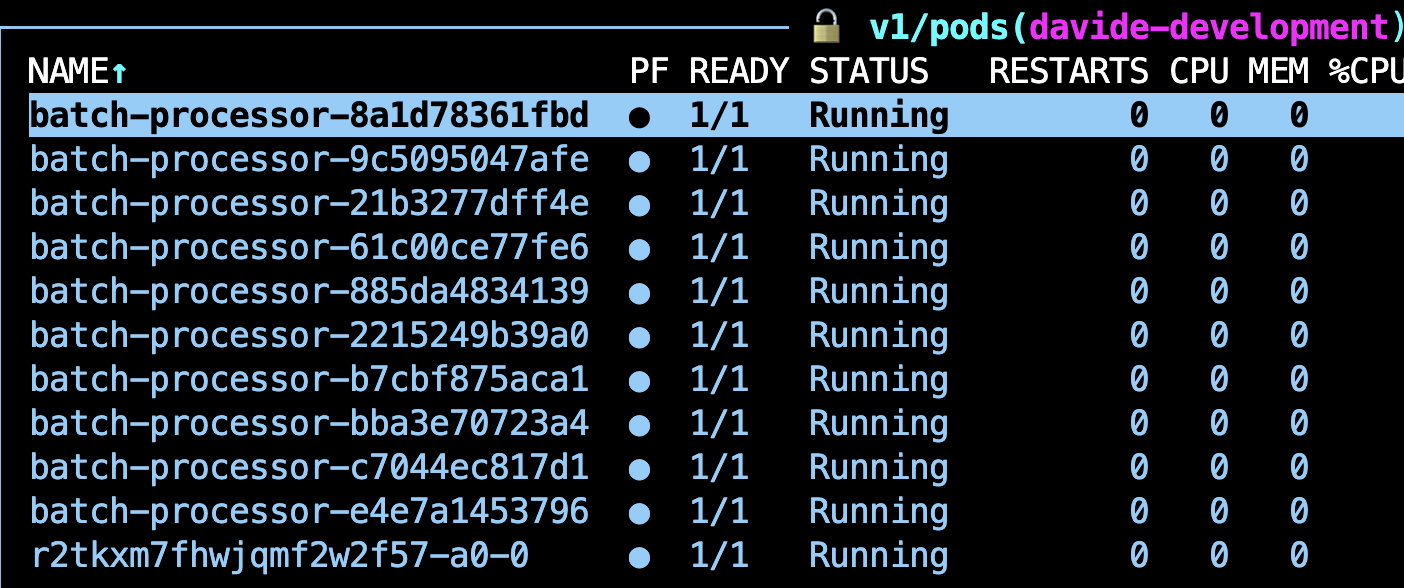
This is, 10 replicas (as defined in the TaskEnvironment) and the driver Pod that runs the parent task (a0).
Learn more about the parent task.
Batch Size Selection
Finding the optimal batch size:
- Too small: More overhead from task management, less efficient
- Too large: Longer recovery time on failures, higher memory usage
Factors to consider:
- Item processing time (longer = larger batches)
- Memory consumption per item (higher = smaller batches)
- Failure tolerance (critical = smaller batches for faster recovery)
- Total workload size (larger total = can use larger batches)
Read the Optimization strategies page to understand the overheads associated with an execution and how to choose the appropiate batch size.
Summary
This notebook demonstrated a production-ready micro-batching pattern for Flyte v2 that combines:
- Reusable Containers for efficiency
- @flyte.trace for checkpointing and recovery
- Massive parallelism via async/await
- Robust error handling for resilience
Key Takeaways:
- Use
@flyte.tracefor non-deterministic operations - Monitor resource usage and optimize incrementally
- Choose the right pattern for your specific use case
Next Steps:
- Adapt this pattern to your specific use case
- Replace mock functions with real API calls
- Test with your actual dataset
- Monitor and optimize based on production metrics