
From Flyte 1 to 2
section.md. This single file contains all pages in this section, optimized for AI coding agent context.
Flyte 2 represents a fundamental shift in how Flyte workflows are written and executed.
Pure Python execution
Write workflows in pure Python, enabling a more natural development experience and removing the constraints of a domain-specific language (DSL).
import flyte

env = flyte.TaskEnvironment("sync_example_env")

@env.task
def hello_world(name: str) -> str:
    return f"Hello, {name}!"

@env.task
def main(name: str) -> str:
    for i in range(10):
        hello_world(name)
    return "Done"

if __name__ == "__main__":
    flyte.init_from_config()
    r = flyte.run(main, name="World")
    print(r.name)
    print(r.url)
    r.wait()
import asyncio
import flyte

env = flyte.TaskEnvironment("async_example_env")

@env.task
async def hello_world(name: str) -> str:
    return f"Hello, {name}!"

@env.task
async def main(name: str) -> str:
    results = []
    for i in range(10):
        results.append(hello_world(name))
    await asyncio.gather(*results)
    return "Done"

if __name__ == "__main__":
    flyte.init_from_config()
    r = flyte.run(main, name="World")
    print(r.name)
    print(r.url)
    r.wait()
As you can see in the hello world example, workflows can be constructed at runtime, allowing for more flexible and adaptive behavior. Flyte 2 supports:
- Python’s asynchronous programming model to express parallelism.
- Python’s native error handling with
try-exceptto overridden configurations, like resource requests. - Predefined static workflows when compile-time safety is critical.
Simplified API
The new API is more intuitive, with fewer abstractions to learn and a focus on simplicity.
| Use case | Flyte 1 | Flyte 2 |
|---|---|---|
| Environment management | N/A |
TaskEnvironment |
| Perform basic computation | @task |
@env.task |
| Combine tasks into a workflow | @workflow |
@env.task |
| Create dynamic workflows | @dynamic |
@env.task |
| Fanout parallelism | flytekit.map |
Python for loop with asyncio.gather |
| Conditional execution | flytekit.conditional |
Python if-elif-else |
| Catching workflow failures | @workflow(on_failure=...) |
Python try-except |
There is no @workflow decorator. Instead, “workflows” are authored through a pattern of tasks calling tasks.
Tasks are defined within environments, which encapsulate the context and resources needed for execution.
Fine-grained reproducibility and recoverability
As in Flyte 1, Flyte 2 supports caching at the task level (via @env.task(cache=...)), but it further enables recovery at the finer-grained, sub-task level through a feature called tracing (via @flyte.trace).
import flyte

env = flyte.TaskEnvironment(name="trace_example_env")

@flyte.trace
async def call_llm(prompt: str) -> str:
    return "Initial response from LLM"

@env.task
async def finalize_output(output: str) -> str:
    return "Finalized output"

@env.task(cache=flyte.Cache(behavior="auto"))
async def main(prompt: str) -> str:
    output = await call_llm(prompt)
    output = await finalize_output(output)
    return output

if __name__ == "__main__":
    flyte.init_from_config()
    r = flyte.run(main, prompt="Prompt to LLM")
    print(r.name)
    print(r.url)
    r.wait()
Here call_llm runs in the same container as main and acts as an automated checkpoint with full observability in the UI.
If the task fails due to a system error (e.g., node preemption or infrastructure failure), Flyte can recover and replay from the
last successful trace rather than restarting from the beginning.
Note that tracing is distinct from caching: traces are recovered only if there is a system failure whereas with cached outputs are persisted for reuse across separate runs.
Improved remote functionality
Flyte 2 provides full management of the workflow lifecycle through a standardized API through the CLI and the Python SDK.
| Use case | CLI | Python SDK |
|---|---|---|
| Run a task | flyte run ... |
flyte.run(...) |
| Deploy a task | flyte deploy ... |
flyte.deploy(...) |
You can also fetch and run remote (previously deployed) tasks within the course of a running workflow.
import flyte
from flyte import remote

env_1 = flyte.TaskEnvironment(name="env_1")
env_2 = flyte.TaskEnvironment(name="env_2")
env_1.add_dependency(env_2)


@env_2.task
async def remote_task(x: str) -> str:
    return "Remote task processed: " + x


@env_1.task
async def main() -> str:
    remote_task_ref = remote.Task.get("env_2.remote_task", auto_version="latest")
    r = await remote_task_ref(x="Hello")
    return "main called remote and recieved: " + r


if __name__ == "__main__":
    flyte.init_from_config()
    d = flyte.deploy(env_1)
    print(d[0].summary_repr())
    r = flyte.run(main)
    print(r.name)
    print(r.url)
    r.wait()
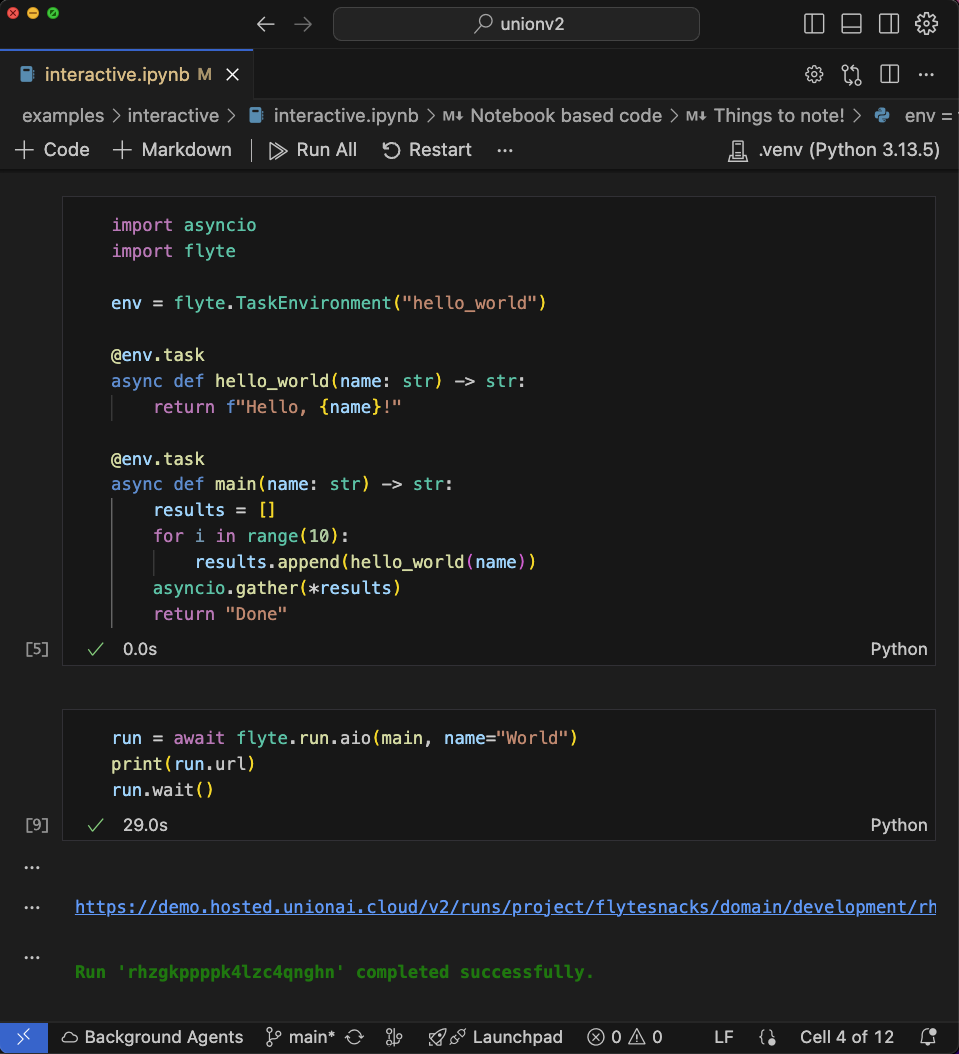
Native Notebook support
Author and run workflows and fetch workflow metadata (I/O and logs) directly from Jupyter notebooks.
High performance engine
When running on a Union.ai backend, Flyte 2 enables you to schedule tasks in milliseconds with reusable containers, which massively increases the throughput of containerized tasks.
# Currently required to enable resuable containers
reusable_image = flyte.Image.from_debian_base().with_pip_packages("unionai-reuse>=0.1.10")

env = flyte.TaskEnvironment(
    name="reusable-env",
    resources=flyte.Resources(memory="1Gi", cpu="500m"),
    reusable=flyte.ReusePolicy(replicas=2, concurrency=1), # Specify reuse policy
    image=reusable_image  # Use the container image augmented with the unionai-reuse library.
)
Coupled with multi-cluster, multi-cloud, and multi-region support, Flyte 2 on Union.ai can scale to handle even the most demanding workflows.
Enhanced UI
The Union.ai backend also offers a new UI with a streamlined and user-friendly experience for authoring and managing workflows.
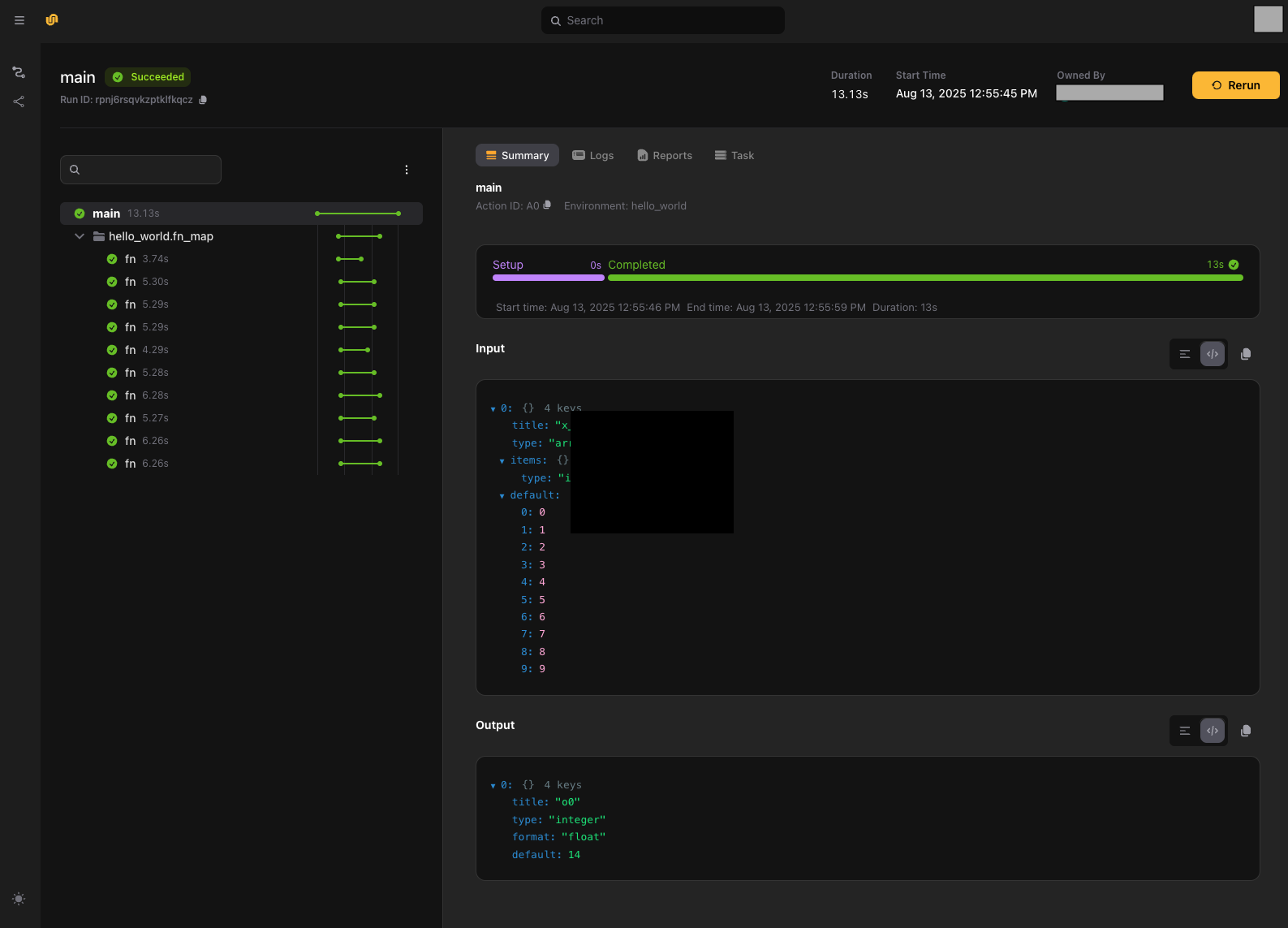
This UI improves the visualization of workflow execution and monitoring, simplifying access to logs, metadata, and other important information.