
Fine-tuning a vision-language model with a frozen backbone
Large vision-language models like Qwen2.5-VL are remarkably capable out of the box. But adapting one to a specialized task raises an immediate question: do you really need to update 3 billion parameters?
Usually, no. The frozen backbone pattern is a practical alternative: keep all pretrained weights frozen and train only a small, task-specific adapter inserted before the vision encoder. The adapter learns to transform its input in a way that makes the frozen model perform well on your task without touching the underlying billions of parameters. The result is faster training, lower memory pressure, and a much smaller set of weights to store and version.
This tutorial makes that pattern concrete. We take a partially-occluded image classification task — CIFAR-10 images with random black rectangles covering 22–45% of the frame — and train a tiny Conv2d adapter to “see through” the occlusion before the frozen VLM processes it. The adapter has approximately 10,500 trainable parameters. The backbone has 3 billion.
The machine learning is interesting, but the real focus here is on shipping a production-grade training pipeline:
- Multi-node distributed training across 2 nodes × 4 GPUs using PyTorch Elastic and DeepSpeed Stage 2
- Automatic fault tolerance: checkpoints upload to object storage after every validation epoch; if training fails, the pipeline returns the last known-good checkpoint instead of crashing
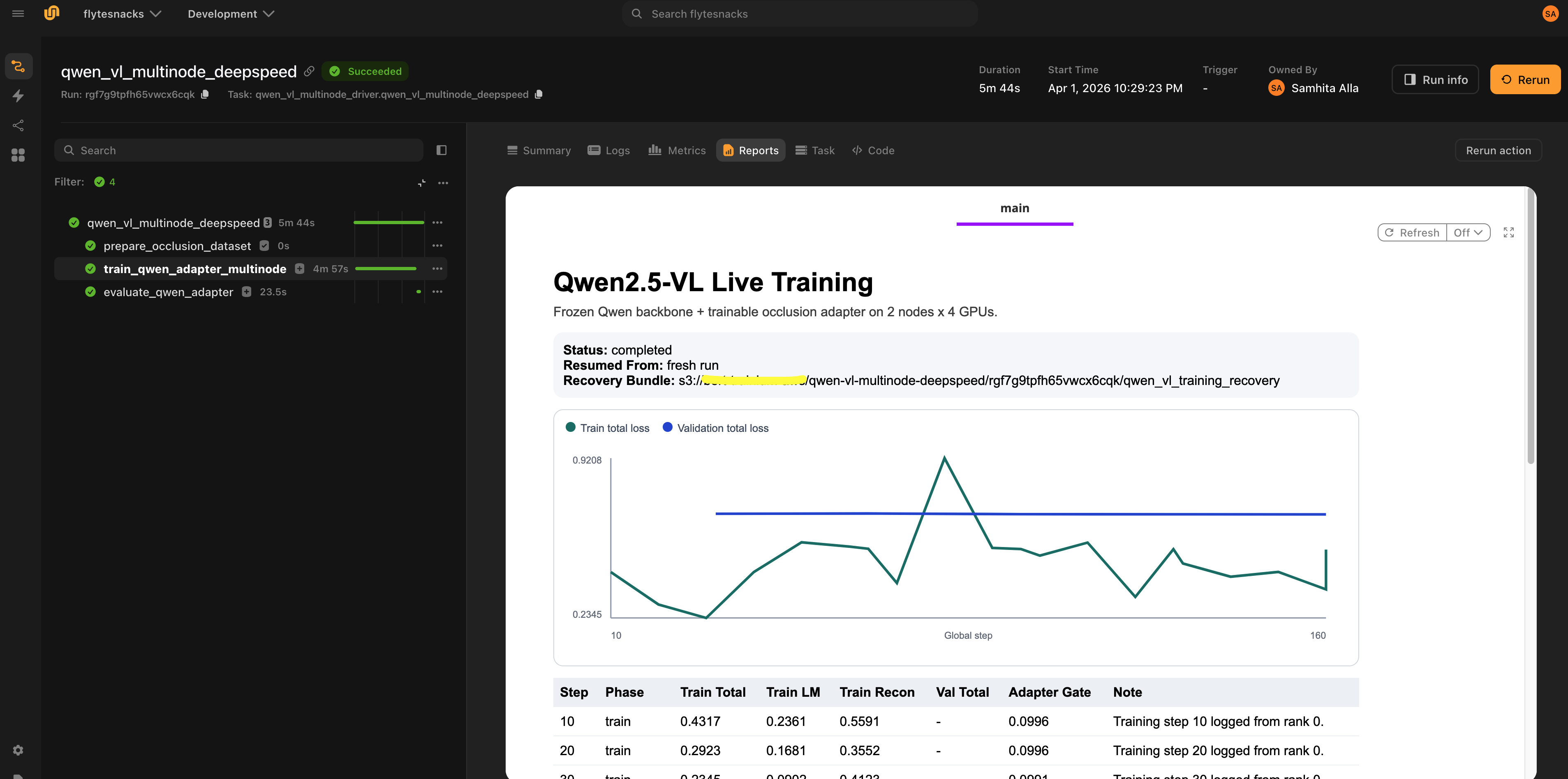
- Live observability: a streaming HTML dashboard in the Flyte UI updates in real-time as training runs, no separate monitoring infrastructure required
- Cached data preparation: dataset processing runs once and is reused across all reruns
- Clean task isolation: each stage runs with exactly the resources it needs, nothing more
Full code available here.
Overview
The pipeline has four tasks with clearly defined responsibilities:
- Dataset preparation (
prepare_occlusion_dataset): Downloads CIFAR-10, applies random occlusions, and writes image manifests as streaming JSONL files to object storage. Runs on CPU and is cached, so it only runs once regardless of how many times you rerun the pipeline with the same config. - Multi-node training (
train_qwen_adapter_multinode): Runs PyTorch Lightning with DeepSpeed Stage 2 across 2 nodes × 4 L40s GPUs. Only the adapter trains; the 3B backbone stays frozen. - Evaluation (
evaluate_qwen_adapter): Loads the saved adapter, runs inference on validation examples, and produces a predictions report. Runs on a single GPU. - Driver (
qwen_vl_multinode_deepspeed): The pipeline entry point. Orchestrates the three tasks above, manages WandB initialization, handles recovery from training failures, and produces a final HTML report in the Flyte UI.
Why this separation? It mirrors how production pipelines should be structured. Data prep is cheap and deterministic so we cache it. Training is expensive and failure-prone so we isolate it with fault tolerance. Evaluation needs different hardware than training. The driver is pure coordination, so it gets minimal resources.
Implementation
Setting up the environment
Different tasks need different compute. Flyte’s TaskEnvironment is how you declare exactly what each task needs.
First, define the container images. Training needs a full CUDA stack with ML libraries, driver compatibility, and DeepSpeed’s build tools:
gpu_image = (
    flyte.Image.from_base("nvidia/cuda:12.8.0-cudnn-devel-ubuntu22.04")
    .clone(name="qwen_vl_multinode_deepspeed", python_version=(3, 13), extendable=True)
    .with_apt_packages("build-essential")
    .with_pip_packages(
        "torch==2.9.1",
        "torchvision==0.24.1",
        "lightning==2.6.1",
        "transformers==4.57.3",
        "deepspeed==0.18.8",
        "datasets==4.4.1",
        "pillow==11.3.0",
        "flyteplugins-pytorch>=2.0.11",
        "flyteplugins-jsonl>=2.0.11",
        "flyteplugins-wandb>=2.0.11",
    )
)
from_base starts from the official NVIDIA CUDA image, giving you NCCL, cuDNN, and the right driver headers out of the box. with_apt_packages("build-essential") is required because DeepSpeed compiles CUDA kernels at first use and without build tools, it silently falls back to slower CPU implementations. The non-GPU image for data preparation and orchestration is much lighter:
non_gpu_image = flyte.Image.from_debian_base(
    name="qwen_vl_multinode_deepspeed_non_gpu"
).with_pip_packages(
    "flyteplugins-pytorch>=2.0.11",
    "flyteplugins-jsonl>=2.0.11",
    "flyteplugins-wandb>=2.0.11",
    "lightning==2.6.1",
    "datasets==4.4.1",
    "pillow==11.3.0",
    "torchvision==0.24.1",
)
With images defined, each task gets its own resource declaration:
dataset_env = flyte.TaskEnvironment(
    name="qwen_vl_dataset_prep",
    image=non_gpu_image,
    resources=flyte.Resources(cpu=5, memory="15Gi"),
    cache="auto",
)

training_env = flyte.TaskEnvironment(
    name="qwen_vl_multinode_training",
    image=gpu_image,
    resources=flyte.Resources(
        cpu=42,
        memory="256Gi",
        gpu=f"L40s:{DEVICES_PER_NODE}",
        shm="16Gi",
    ),
    plugin_config=Elastic(nnodes=NUM_NODES, nproc_per_node=DEVICES_PER_NODE),
    secrets=[
        flyte.Secret(key="wandb_api_key", as_env_var="WANDB_API_KEY")
    ],  # TODO: update with your own secret key
    env_vars={
        "TORCH_DISTRIBUTED_DEBUG": "INFO",
        "NCCL_DEBUG": "WARN",
        "TOKENIZERS_PARALLELISM": "false",
        "CUDA_HOME": "/usr/local/cuda",
        "DS_SKIP_CUDA_CHECK": "1",
    },
)

evaluation_env = flyte.TaskEnvironment(
    name="qwen_vl_adapter_eval",
    image=gpu_image,
    resources=flyte.Resources(cpu=16, memory="64Gi", gpu="L40s:1"),
    cache="auto",
)

driver_env = flyte.TaskEnvironment(
    name="qwen_vl_multinode_driver",
    image=non_gpu_image,
    resources=flyte.Resources(cpu=2, memory="4Gi"),
    depends_on=[dataset_env, training_env, evaluation_env],
)
A few things worth noting here:
Elastic(nnodes=2, nproc_per_node=4): Flyte’s integration with PyTorch’s elastic launch. It handles process spawning (one process per GPU), rank assignment, and distributed environment setup — master address, world size, rendezvous — without any shell scripting or manualtorchruninvocations.shm="16Gi": Shared memory is required for NCCL inter-GPU communication on the same node. Without it, you’ll see cryptic errors from the communication library when training starts.cache="auto": The dataset preparation task is cached by input hash. Running the pipeline twice with the same hyperparameters skips it entirely on the second run.depends_on: The driver task declares that each worker image must finish building before it starts, ensuring containers are ready before the driver begins orchestrating.secrets: The WandB API key is injected from Flyte’s secret store as an environment variable. No credentials in code.
All training hyperparameters flow through a single typed dataclass:
@dataclass
class Config:
    model_name: str = DEFAULT_MODEL_NAME
    image_size: int = IMAGE_SIZE
    max_train_samples: int = 1024
    max_val_samples: int = 256
    epochs: int = 8
    per_device_batch_size: int = 1
    target_global_batch_size: int = 16
    learning_rate: float = 2e-4
    weight_decay: float = 1e-2
    reconstruction_loss_weight: float = 0.35
    report_every_n_steps: int = 10
    num_workers: int = 4
    max_length: int = 512
    eval_examples: int = 16
    train_occlusion_min: float = 0.22
    train_occlusion_max: float = 0.42
    eval_occlusion_min: float = 0.28
    eval_occlusion_max: float = 0.45
    seed: int = 7

    def to_dict(self) -> dict:
        return asdict(self)
Using a dataclass rather than scattered constants or argparse arguments means the full config is serializable, can be stored in artifact metadata alongside the model checkpoint, and flows cleanly as a typed input between tasks. The to_dict() method serializes it for WandB logging.
Preparing the dataset
The dataset task handles everything: downloading CIFAR-10, generating occlusions, and writing the manifests.
@dataset_env.task
async def prepare_occlusion_dataset(config: Config) -> DatasetArtifacts:
    from PIL import Image
    from torchvision.datasets import CIFAR10
    from flyte.io import Dir
    from flyteplugins.jsonl import JsonlFile
    import random

    rng = random.Random(config.seed)

    images_dir = Path("/tmp/qwen_vl_occlusion_images")
    train_images_dir = images_dir / "train" / "images"
    val_images_dir = images_dir / "validation" / "images"
    train_images_dir.mkdir(parents=True, exist_ok=True)
    val_images_dir.mkdir(parents=True, exist_ok=True)

    prompt = (
        "The image may be partially occluded. "
        "Answer with exactly one CIFAR-10 class label: "
        + ", ".join(CLASS_NAMES)
        + ". What is the main object?"
    )

    async def export_split(
        dataset,
        split_name: str,
        limit: int,
        local_image_dir: Path,
        occ_min: float,
        occ_max: float,
    ):
        out = JsonlFile.new_remote(f"{split_name}_manifest.jsonl")
        async with out.writer() as writer:
            for idx in range(limit):
                pil_image, label_idx = dataset[idx]
                resized = pil_image.resize(
                    (config.image_size, config.image_size),
                    resample=Image.Resampling.BICUBIC,
                )
                rel_path = f"{split_name}/images/{split_name}-{idx:05d}.png"
                resized.save(local_image_dir / f"{split_name}-{idx:05d}.png")
                occlusion = build_occlusion_box(
                    width=config.image_size,
                    height=config.image_size,
                    rng=rng,
                    min_fraction=occ_min,
                    max_fraction=occ_max,
                )
                await writer.write(
                    {
                        "image_path": rel_path,
                        "label": CLASS_NAMES[label_idx],
                        "label_index": int(label_idx),
                        "prompt": prompt,
                        "occlusion": occlusion,
                    }
                )
        return out

    train_dataset = CIFAR10(root="/tmp/cifar10", train=True, download=True)
    val_dataset = CIFAR10(root="/tmp/cifar10", train=False, download=True)

    train_manifest = await export_split(
        train_dataset,
        "train",
        config.max_train_samples,
        train_images_dir,
        config.train_occlusion_min,
        config.train_occlusion_max,
    )
    val_manifest = await export_split(
        val_dataset,
        "validation",
        config.max_val_samples,
        val_images_dir,
        config.eval_occlusion_min,
        config.eval_occlusion_max,
    )

    return DatasetArtifacts(
        train_manifest=train_manifest,
        val_manifest=val_manifest,
        images=await Dir.from_local(str(images_dir)),
    )
Each image gets a randomly-placed black rectangle. The occlusion covers 22–42% of the image area during training and 28–45% during evaluation. The occlusion is deliberately harder at eval time to test how robust the adapter is. The bounding box coordinates are written into each manifest record alongside the image path and ground-truth label, so the training task can reconstruct the binary occlusion mask as the adapter’s fourth input channel.
Two Flyte primitives handle data persistence without any manual storage management:
JsonlFile.new_remote()opens a streaming writer that writes directly to remote object storage. The training task reads records back viajf.iter_records_sync(), so no local file paths and S3 credentials to manage.Dir.from_local()uploads the local images directory to object storage and returns a typed handle. The training task downloads it to a local path viaDir.download_sync().
Because cache="auto" is set on this task, dataset preparation runs once. Subsequent reruns with the same config skip it entirely.
The adapter
Here’s the entire trainable component of the model with ~10,500 parameters:
class ResidualOcclusionAdapter(nn.Module):
    def __init__(self, hidden_channels: int = 32):
        super().__init__()
        self.net = nn.Sequential(
            nn.Conv2d(4, hidden_channels, kernel_size=3, padding=1),
            nn.GELU(),
            nn.Conv2d(hidden_channels, hidden_channels, kernel_size=3, padding=1),
            nn.GELU(),
            nn.Conv2d(hidden_channels, 3, kernel_size=1),
            nn.Tanh(),
        )
        self.gate = nn.Parameter(torch.tensor(0.10))

    def forward(
        self, pixel_values: torch.Tensor, occlusion_mask: torch.Tensor
    ) -> torch.Tensor:
        if pixel_values.ndim != 4:
            raise ValueError(
                "ResidualOcclusionAdapter expects dense image tensors with shape "
                f"(B, C, H, W), but received {tuple(pixel_values.shape)}."
            )
        if occlusion_mask.ndim == 3:
            occlusion_mask = occlusion_mask.unsqueeze(1)
        adapter_input = torch.cat(
            [pixel_values, occlusion_mask.to(pixel_values.dtype)],
            dim=1,
        )
        residual = self.net(adapter_input)
        return pixel_values + torch.tanh(self.gate) * residual
The adapter takes the occluded image (3 channels) concatenated with the binary occlusion mask (1 channel) as a 4-channel input. It predicts a residual correction through a small convolutional network, then adds that correction back to the original pixels. The learnable gate scalar, initialized to 0.10, controls how strongly the adapter modifies the image. It starts as a near-identity transformation and gradually grows during training as the adapter gains confidence.
The adapter is plugged into Qwen2.5-VL via a Lightning module:
class QwenVLAdapterModule(L.LightningModule):
    def __init__(
        self,
        model_name: str,
        learning_rate: float,
        weight_decay: float,
        reconstruction_loss_weight: float,
    ):
        super().__init__()
        from transformers import Qwen2_5_VLForConditionalGeneration

        self.save_hyperparameters()
        self.adapter = ResidualOcclusionAdapter()

        self.backbone = Qwen2_5_VLForConditionalGeneration.from_pretrained(
            model_name,
            torch_dtype=torch.bfloat16,
            attn_implementation="sdpa",
        )
        self.backbone.requires_grad_(False)
        self.backbone.gradient_checkpointing_enable()

        # DeepSpeed checkpoints only persist the trainable adapter weights when
        # `exclude_frozen_parameters=True`. On resume we rebuild the frozen
        # backbone from Hugging Face and load the checkpoint non-strictly.
        self.strict_loading = False

        self.total_params, self.trainable_params = count_parameters(self)
        self.example_input_array = None
        self.vision_patch_size = int(self.backbone.config.vision_config.patch_size)
        self.temporal_patch_size = int(
            getattr(self.backbone.config.vision_config, "temporal_patch_size", 1)
        )
The key line is self.backbone.requires_grad_(False). This freezes all 3 billion backbone parameters which means only the adapter’s ~10,500 weights receive gradients. gradient_checkpointing_enable() trades compute for memory: instead of keeping the frozen backbone’s intermediate activations in GPU memory during the backward pass, they’re recomputed on the fly. This is critical when a 3B model is sitting in GPU memory alongside your optimizer state.
strict_loading = False handles an important DeepSpeed checkpoint detail. When exclude_frozen_parameters=True is set on the strategy, DeepSpeed only saves the adapter weights in checkpoints, not the 3B frozen backbone. On resume, the checkpoint won’t contain backbone weights, so loading must be non-strict. The on_load_checkpoint hook fills in the missing backbone weights from the freshly-loaded HuggingFace model, combining the best of both worlds: small checkpoints and a fully initialized model.
The training loss combines two objectives:
    def _forward_losses(
        self, batch: dict[str, torch.Tensor]
    ) -> dict[str, torch.Tensor]:
        backbone_dtype = next(self.backbone.parameters()).dtype
        if batch["pixel_values"].ndim == 2:
            if "image_grid_thw" not in batch:
                raise ValueError(
                    "Packed Qwen pixel values require `image_grid_thw` to reconstruct "
                    "dense images for the Conv2d adapter."
                )
            grid_thw = batch["image_grid_thw"]
            dense_pixels = packed_pixels_to_dense_images(
                batch["pixel_values"].to(dtype=backbone_dtype),
                grid_thw,
                patch_size=self.vision_patch_size,
                temporal_patch_size=self.temporal_patch_size,
            )
            clean_pixels = packed_pixels_to_dense_images(
                batch["clean_pixel_values"].to(dtype=backbone_dtype),
                grid_thw,
                patch_size=self.vision_patch_size,
                temporal_patch_size=self.temporal_patch_size,
            )
            adapted_dense = self.adapter(dense_pixels, batch["occlusion_mask"])
            adapted_pixels = dense_images_to_packed_pixels(
                adapted_dense,
                grid_thw,
                patch_size=self.vision_patch_size,
                temporal_patch_size=self.temporal_patch_size,
            )
        else:
            clean_pixels = batch["clean_pixel_values"].to(dtype=backbone_dtype)
            adapted_dense = self.adapter(
                batch["pixel_values"].to(dtype=backbone_dtype),
                batch["occlusion_mask"],
            )
            adapted_pixels = adapted_dense

        forward_kwargs = {
            "input_ids": batch["input_ids"],
            "attention_mask": batch["attention_mask"],
            "pixel_values": adapted_pixels,
            "labels": batch["labels"],
        }
        if "image_grid_thw" in batch:
            forward_kwargs["image_grid_thw"] = batch["image_grid_thw"]
        outputs = self.backbone(**forward_kwargs)

        clean_pixels = clean_pixels.to(
            device=adapted_pixels.device, dtype=backbone_dtype
        )
        occlusion_mask = batch["occlusion_mask"].to(
            device=adapted_pixels.device,
            dtype=backbone_dtype,
        )
        if occlusion_mask.ndim == 3:
            occlusion_mask = occlusion_mask.unsqueeze(1)
        if occlusion_mask.shape[-2:] != adapted_dense.shape[-2:]:
            occlusion_mask = F.interpolate(
                occlusion_mask,
                size=adapted_dense.shape[-2:],
                mode="nearest",
            )

        reconstruction_error = (adapted_dense - clean_pixels).abs() * occlusion_mask
        mask_denominator = (occlusion_mask.sum() * adapted_dense.shape[1]).clamp_min(
            1.0
        )

        reconstruction_loss = reconstruction_error.sum() / mask_denominator
        total_loss = (
            outputs.loss + self.hparams.reconstruction_loss_weight * reconstruction_loss
        )

        return {
            "total_loss": total_loss,
            "lm_loss": outputs.loss,
            "reconstruction_loss": reconstruction_loss,
        }
The language modeling loss (cross-entropy on the predicted class label tokens) drives the model to produce correct answers. The reconstruction loss (mean absolute error between the adapter’s output and the clean image, computed only in the occluded region) pushes the adapter to actually restore the missing pixels rather than finding a representation shortcut. Without it, the adapter could overfit the frozen backbone’s quirks and produce correct tokens while generating noise in the masked region. The reconstruction_loss_weight (default 0.35) balances these two objectives.
Because Qwen2.5-VL’s preprocessor packs image patches into a flat (num_patches, patch_dim) tensor, the adapter must unpack this into a spatial (B, C, H, W) tensor, apply the convolutions, then repack. The packed_pixels_to_dense_images and dense_images_to_packed_pixels utilities in model.py handle this format conversion transparently.
Multi-node training with DeepSpeed
The training task is a standard PyTorch Lightning training loop with distributed infrastructure handled by Flyte and DeepSpeed:
@wandb_init
@training_env.task(report=True)
def train_qwen_adapter_multinode(
    train_manifest: JsonlFile,
    val_manifest: JsonlFile,
    images_dir: Dir,
    config: Config,
    resume_from: Optional[Dir] = None,
    recovery_uri: Optional[str] = None,
) -> Optional[Dir]:
The @wandb_init decorator integrates with the wandb_config context created in the driver task. It retrieves the initialized WandB run and attaches a WandbLogger to the trainer. The report=True flag on the task decorator enables Flyte Reports for live dashboard streaming from this task.
DeepSpeed Stage 2 shards optimizer states and gradients across GPUs, reducing per-GPU memory usage significantly. The critical configuration flag here is exclude_frozen_parameters=True:
    strategy = DeepSpeedStrategy(
        stage=2,
        offload_optimizer=False,
        offload_parameters=False,
        process_group_backend="nccl",
        exclude_frozen_parameters=True,
    )
Without exclude_frozen_parameters=True, DeepSpeed would shard and checkpoint the frozen backbone weights too, producing enormous checkpoint files, slow checkpoint saves, and unnecessary communication overhead. With it, only the adapter participates in sharding and checkpointing. The backbone is loaded independently on each worker from HuggingFace.
Gradient accumulation is computed automatically to hit the target global batch size regardless of how many GPUs are actually running:
    world_size = NUM_NODES * DEVICES_PER_NODE
    per_step_batch = world_size * config.per_device_batch_size
    grad_accum_steps = max(
        1,
        math.ceil(config.target_global_batch_size / max(1, per_step_batch)),
    )
With 2 nodes × 4 GPUs × per-device batch size 1, the effective per-step batch is 8. To reach the default target of 16, the trainer accumulates over 2 steps. Change NUM_NODES or per_device_batch_size and the calculation adjusts automatically.
The trainer brings everything together:
    trainer = L.Trainer(
        accelerator="gpu",
        devices=DEVICES_PER_NODE,
        num_nodes=NUM_NODES,
        strategy=strategy,
        logger=wandb_logger,
        precision="bf16-mixed",
        max_epochs=config.epochs,
        accumulate_grad_batches=grad_accum_steps,
        callbacks=[
            checkpoint_callback,
            metrics_callback,
            recovery_callback,
            live_report_callback,
        ],
        gradient_clip_val=1.0,
        benchmark=True,
        log_every_n_steps=1,
    )
precision="bf16-mixed" uses BFloat16, which matches FP32’s dynamic range (unlike FP16), so you don’t need loss scaling. This is the standard choice for modern VLM training. benchmark=True runs cuDNN autotuning on the first batch to select the fastest kernels for your specific input sizes.
Fault tolerance and recovery
Multi-node GPU jobs fail. Hardware hiccups, spot instance preemptions, NCCL timeouts, memory spikes, etc. and the question is when, not if. This pipeline handles it with a two-part system.
After every validation epoch, the RecoveryArtifactCallback calls trainer.save_checkpoint() to write a DeepSpeed checkpoint directory, then uploads all shard files to the recovery URI. Each node’s local rank 0 uploads its own shards; global rank 0 uploads the metadata files (metrics.json, summary.json). A distributed barrier between save and upload ensures all workers finish before training continues.
If training fails, the driver task catches the error and returns the last recovery artifact instead of propagating the failure:
    try:
        with wandb_config(
            project=wandb_project,
            entity=wandb_entity,
        ):
            training_artifacts = train_qwen_adapter_multinode(
                train_manifest=train_manifest,
                val_manifest=val_manifest,
                images_dir=images,
                config=config,
                resume_from=resume_training_artifacts,
                recovery_uri=recovery_uri,
            )
    except flyte.errors.RuntimeUserError as e:
        if recovery_uri is None:
            raise e
        print(f"Training failed - recovering latest checkpoint bundle: {recovery_uri}")
        try:
            recovered_artifacts = Dir(path=recovery_uri)
            recovered_root = await download_dir_async(recovered_artifacts)
            flyte.report.log(
                build_qwen_adapter_report_html(recovered_root, None),
                do_flush=True,
            )
            return recovered_artifacts
        except Exception:
            raise e
A failed run still produces useful output: the best checkpoint reached before the failure, along with a partial training report. To resume from that point, pass the recovery artifact as resume_training_artifacts on the next run. The training task downloads it, finds the most recent .ckpt file, and passes it to trainer.fit() as ckpt_path. Training picks up at the last saved epoch with optimizer state and metrics history intact.
The recovery URI is constructed from the configurable base path and the run name:
s3://your-bucket/qwen-vl-multinode-deepspeed/<run-name>/qwen_vl_training_recovery/This means each run gets its own recovery location, so you can identify exactly which run a checkpoint came from.
Live observability
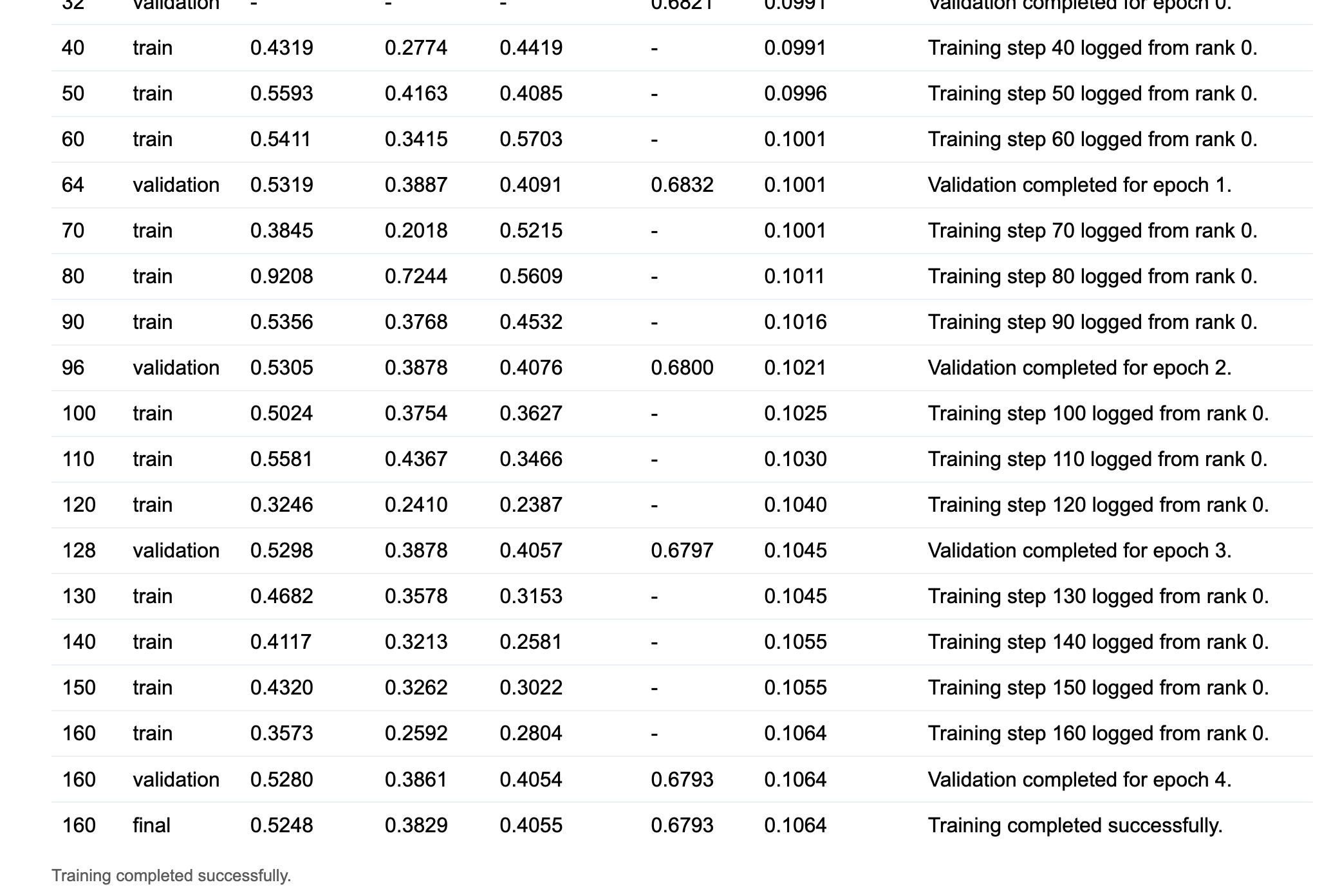
flyte.report lets you push HTML content directly into the Flyte UI during task execution, with no separate monitoring infrastructure. The LiveTrainingReportCallback uses this to stream training metrics in real-time:
    def _push_update(
        self,
        *,
        trainer,
        pl_module,
        status: str,
        phase: str,
        train_total=None,
        train_lm=None,
        train_recon=None,
        val_total=None,
        note: str,
    ) -> None:
        adapter_gate = float(torch.tanh(pl_module.adapter.gate).detach().cpu())

        def fmt(value):
            return f"{float(value):.4f}" if value is not None else "-"

        payload = {
            "step": trainer.global_step,
            "phase": phase,
            "train_total": fmt(train_total),
            "train_lm": fmt(train_lm),
            "train_recon": fmt(train_recon),
            "val_total": fmt(val_total),
            "train_total_value": (
                float(train_total) if train_total is not None else None
            ),
            "val_total_value": float(val_total) if val_total is not None else None,
            "adapter_gate": f"{adapter_gate:.4f}",
            "status": status,
            "resumed_from": self.resumed_from or "fresh run",
            "recovery_path": self.recovery_callback.latest_path
            or "pending first checkpoint upload",
            "note": note,
        }
        flyte.report.log(
            f"""
            <script>
            if (typeof window.updateQwenLiveReport === "function") {{
                window.updateQwenLiveReport({json.dumps(payload)});
            }}
            </script>
            """,
            do_flush=True,
        )
on_train_start (see the full code) initializes the dashboard with an SVG loss chart and an HTML metrics table. Every report_every_n_steps training steps, _push_update serializes the latest metrics into a <script> block and calls flyte.report.log() to append it to the live page. The JavaScript updateQwenLiveReport() function then updates the chart polylines and appends a new table row for each step.
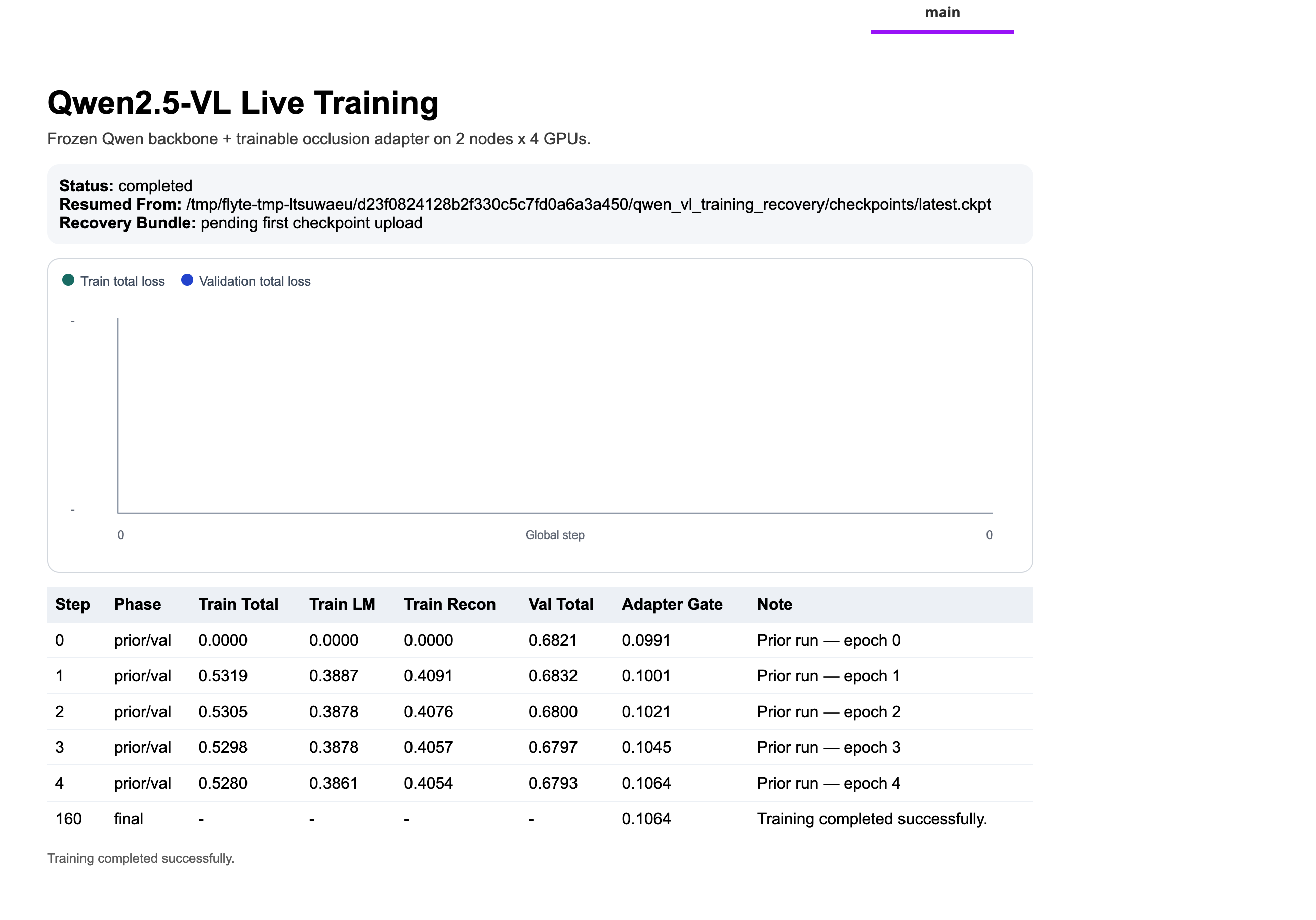
For resumed runs, the prior metrics history is seeded into the table on on_train_start, so the metrics view is continuous across runs rather than restarting from zero.
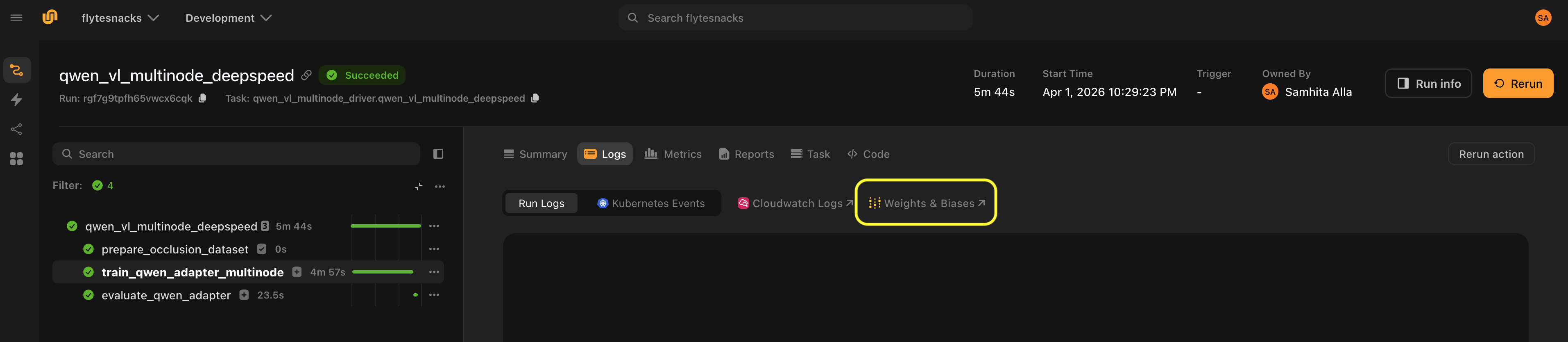
WandB metrics are logged in parallel by AdapterMetricsCallback after each validation epoch, including per-epoch train and validation losses, the LM loss component, the reconstruction loss component, and the current adapter gate value.
Evaluation
After training completes, a separate task runs inference on a single GPU:
@evaluation_env.task
async def evaluate_qwen_adapter(
    val_manifest: JsonlFile,
    images_dir: Dir,
    training_artifacts: Dir,
    config: Config,
) -> Dir:
The task is async so the driver can asyncio.gather the downloads of training artifacts and images in parallel rather than sequentially, a simple speedup that matters when downloading hundreds of megabytes from object storage.
The evaluation task loads the adapter state dict from adapter_artifact.pt, rebuilds the frozen backbone fresh from HuggingFace (there’s no need to checkpoint 3B weights, only the ~10,500 adapter weights travel with the artifact), and runs greedy decoding on each validation example. The metric is exact-match accuracy between the model’s predicted class token and the ground-truth CIFAR-10 label.
Putting it all together
The driver task is the pipeline entry point that all other tasks flow through:
@driver_env.task(report=True)
async def qwen_vl_multinode_deepspeed(
    model_name: str = DEFAULT_MODEL_NAME,
    max_train_samples: int = 1024,
    max_val_samples: int = 256,
    epochs: int = 8,
    per_device_batch_size: int = 1,
    target_global_batch_size: int = 16,
    learning_rate: float = 2e-4,
    reconstruction_loss_weight: float = 0.35,
    eval_examples: int = 16,
    resume_training_artifacts: Optional[Dir] = None,
    checkpoint_base_uri: Optional[str] = DEFAULT_CHECKPOINT_BASE_URI,
    wandb_project: str = "qwen-vl-multinode-deepspeed",
    wandb_entity: Optional[str] = None,
) -> Optional[Dir]:
The driver constructs the recovery URI from checkpoint_base_uri and the current run name, prepares the dataset (or retrieves it from cache), then executes training inside a wandb_config context. The wandb_config context manager creates and registers a WandB run; the @wandb_init decorator on the training task retrieves it, updates it with the full Config dataclass, and attaches a WandbLogger. Neither the training task nor the callbacks need any WandB initialization code of their own.
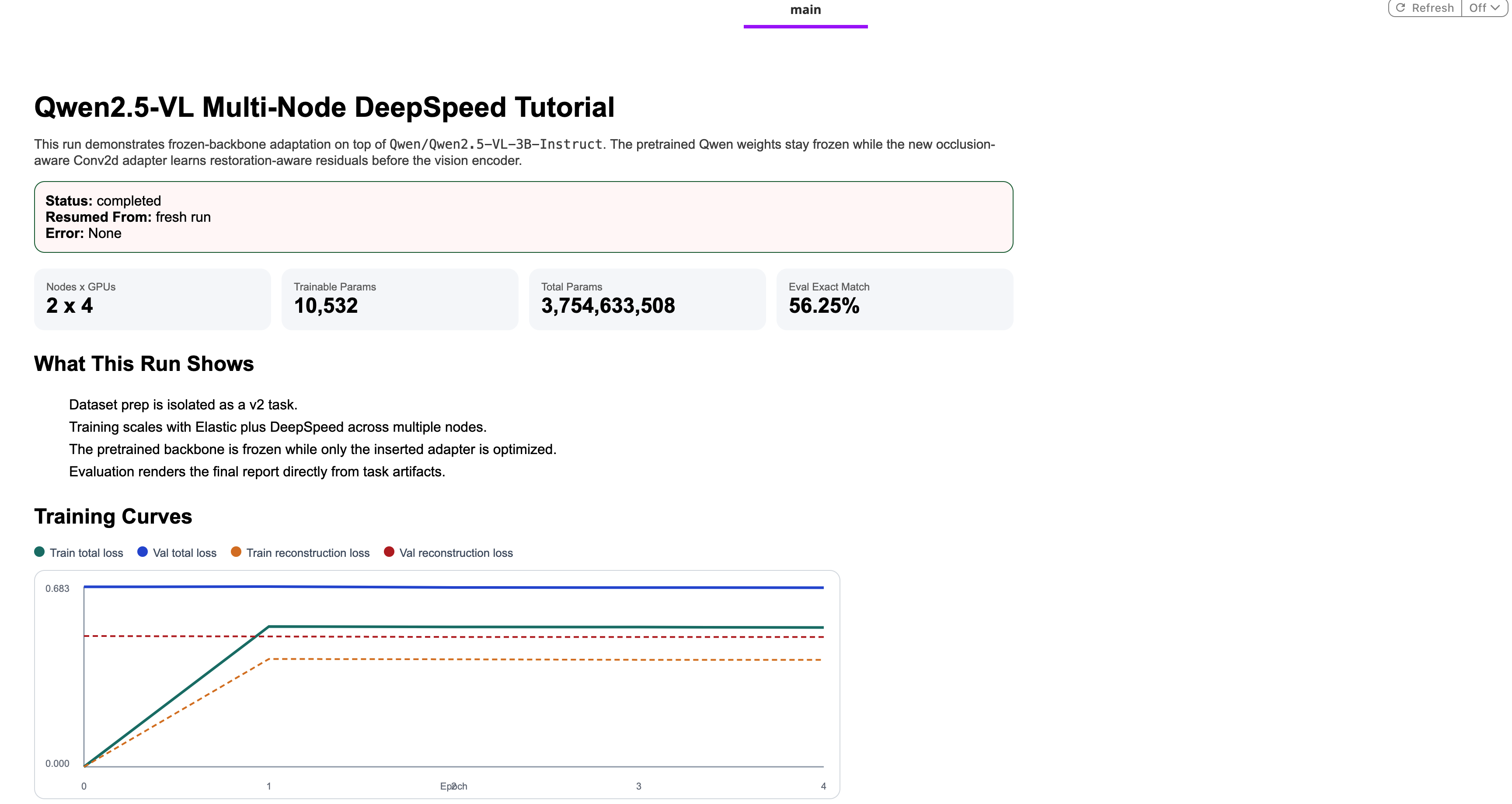
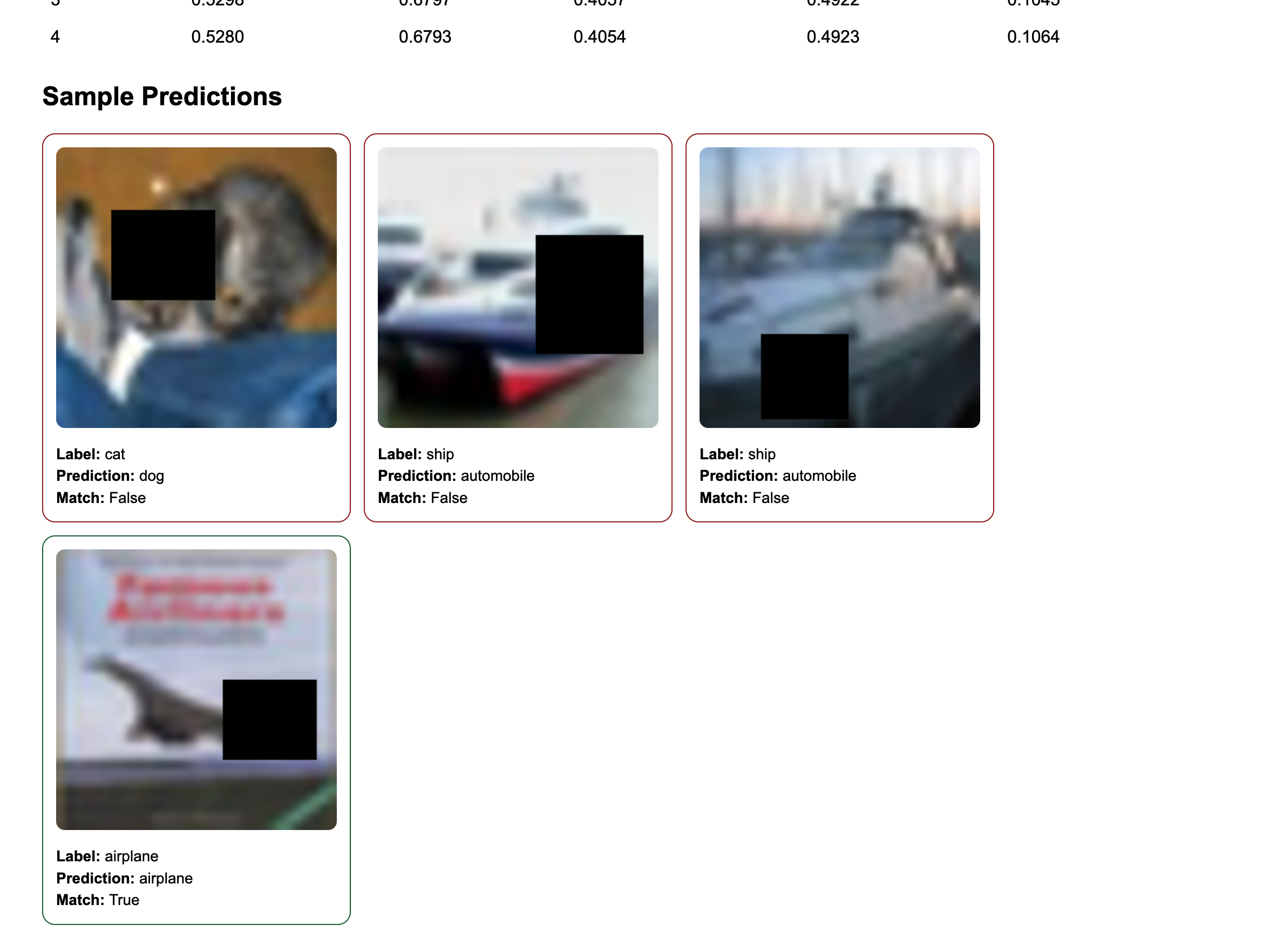
The recovery handler (shown in the previous section) wraps the training call. If training succeeds, evaluation runs next. The driver then downloads both the training and evaluation artifacts concurrently and assembles a final HTML report with training curves, evaluation summary, per-epoch metrics table, and sample prediction cards with the actual occluded images, which is pushed to Flyte Reports.
Running the tutorial
Before running, update two placeholders in config.py:
DEFAULT_CHECKPOINT_BASE_URI: your S3, GCS, or Azure Blob URI for checkpoint storage- The
wandb_api_keysecret key name to match your cluster’s secret store configuration
Then configure and launch:
if __name__ == "__main__":
    flyte.init_from_config()

    run = flyte.run(
        qwen_vl_multinode_deepspeed,
        model_name=DEFAULT_MODEL_NAME,
        max_train_samples=512,
        max_val_samples=128,
        epochs=5,
        per_device_batch_size=1,
        target_global_batch_size=16,
        learning_rate=2e-4,
        reconstruction_loss_weight=0.35,
        eval_examples=16,
        checkpoint_base_uri=DEFAULT_CHECKPOINT_BASE_URI,
        wandb_project="qwen-vl-multinode-deepspeed",
        wandb_entity="<YOUR_WANDB_ENTITY>",  # TODO: update with your own wandb entity
        # resume_training_artifacts=Dir(
        #     path="s3://flyte-examples/qwen-vl-multinode-deepspeed/<ACTION_NAME>/qwen_vl_training_recovery/"
        # ),
    )

    print(f"Run URL: {run.url}")
flyte create config --endpoint <YOUR_ENDPOINT> --project <PROJECT> --domain <DOMAIN> --builder remote
uv run train.py
When you run this, the pipeline:
- Builds containers once and caches them for subsequent runs
- Prepares the dataset: downloads CIFAR-10, generates occlusions, writes JSONL manifests; cached on subsequent runs with the same config
- Launches multi-node training: provisions 2 × 4 L40s GPUs and starts the Elastic job
- Streams metrics to the live dashboard: the Flyte Reports view starts updating as soon as the first step logs
- Runs evaluation: a single-GPU task loads the adapter and runs inference, computing exact-match accuracy
- Generates the final report: training curves, evaluation summary, and sample prediction cards appear in the Flyte UI
To resume a failed or interrupted run, uncomment the resume_training_artifacts line in train.py and point it to the recovery URI from the previous run. Training picks up from the last checkpoint with metrics history intact.
Going further
Adapting this to a different task. The frozen backbone pattern transfers directly. Replace QwenOcclusionDataset and prepare_occlusion_dataset with your own data, update the prompt template, and adjust the dual loss if a pixel-level reconstruction term doesn’t apply to your task. The multi-node Elastic setup, DeepSpeed Stage 2 config, recovery system, and live reporting are completely reusable.
Using a larger Qwen model. Change DEFAULT_MODEL_NAME to Qwen/Qwen2.5-VL-7B-Instruct or a larger variant. You may need to increase memory in training_env and reduce per_device_batch_size. The frozen backbone + adapter pattern becomes more valuable at larger scales where you’re always training the same ~10,500-parameter adapter regardless of backbone size.
Training keeps failing. Add retries=3 to the @training_env.task decorator. With the recovery callback uploading checkpoints after every validation epoch, Flyte automatically restarts training from the last checkpoint on transient failures. Spot instance preemptions and most hardware hiccups become non-events.
Scaling to more nodes. Increase NUM_NODES in config.py. The Elastic plugin, DeepSpeed strategy, and gradient accumulation calculation all adapt automatically. The recovery system is unchanged as each run still gets its own recovery URI.